partitionを使ってクイックセレクト関数を書く
partitionを使い、quick selectアルゴリズムを書く。quick selectでは「配列がソートされたときに、n番目に来る値」を取得できる。これを利用して中央値を取得できる。n番目の要素を特定するのに必要な処理が完了したらクイックソートを中断することで実現するので、データの順番が入れ替わるが、全部ソートするほどの時間はかからない。
C++でpartitionするプログラムを変更して[pivot未満][pivot][pivotより大きい]の領域に分割する
#include <iostream>
#include <vector>
#include <algorithm>

#include "partition_3area.hpp"
void quick_select(std::vector<PairTypeFloat>& arr,size_t low,size_t high, size_t target_index) {

    size_t nlow = low;
    size_t nhigh = high;
    size_t tmp_pivot_index = low + (nhigh - nlow) / 2; //なにかしらpivotを決める

    // pivotでパーティション
    PartitionFuncFloat cond(arr, tmp_pivot_index);
    std::array<int64_t, 3> ret= partition_3area(arr, nlow, nhigh, cond);

    nlow = ret[0]; // 左側開始位置
    size_t newpivot = ret[1]; // 処理後のpivotの位置
    nhigh = ret[2]; // 右側終了位置

    // [nlow~newpivot-1][newpivot][newpivot+1~nhigh] に分割される
    // このとき、
    if (newpivot == target_index) {
        // [nlow~newpivot-1][target_index][newpivot+1~nhigh] であれば、
        // target_indexの要素番号のデータはtarget_index番目の要素になっている
        return ;
    }
    else if (target_index < newpivot) {
        // [target_indexを含む][newpivot][newpivot+1~nhigh] であれば、
        // 左側を処理
        quick_select(arr, nlow, newpivot, target_index);
    }
    else {
        // [nlow~newpivot-1][newpivot][target_indexを含む] であれば、
        // 右側を処理
        quick_select(arr, newpivot+1, nhigh, target_index);
    }

}
int main()
{
    std::vector<PairTypeFloat> arr;

    arr.push_back(std::make_pair(3.7, "a"));
    arr.push_back(std::make_pair(2.3, "b"));
    arr.push_back(std::make_pair(7.5, "c"));
    arr.push_back(std::make_pair(1.2, "d"));
    arr.push_back(std::make_pair(6.8, "e"));
    arr.push_back(std::make_pair(5.6, "f"));
    arr.push_back(std::make_pair(2.4, "g"));
    arr.push_back(std::make_pair(0.9, "h"));
    arr.push_back(std::make_pair(6.1, "i"));
    arr.push_back(std::make_pair(5.8, "j"));//
    arr.push_back(std::make_pair(4.5, "k"));
    arr.push_back(std::make_pair(8.2, "l"));
    arr.push_back(std::make_pair(9.1, "m"));
    arr.push_back(std::make_pair(1.7, "n"));
    arr.push_back(std::make_pair(5.3, "o"));
    arr.push_back(std::make_pair(7.7, "p"));
    arr.push_back(std::make_pair(3.8, "q"));
    arr.push_back(std::make_pair(4.2, "r"));

    std::cout << "処理前の配列: " << std::endl;
    for (size_t i = 0; i < arr.size(); i++) {
        std::cout << "[" << i << "] " << arr[i].first << " " << arr[i].second << std::endl;
    }

    size_t target_index = arr.size() / 2;
    std::cout << target_index << "番目の要素: " << arr[target_index].first << " " << arr[target_index].second << std::endl;

    quick_select(arr, 0, arr.size(), target_index);// 中央値を求める

    std::cout << "--------------------------------------------" << std::endl;
    std::cout << "処理後の配列: " << std::endl;
    for (size_t i = 0; i < arr.size(); i++) {
        std::cout << "[" << i << "] " << arr[i].first << " " << arr[i].second << std::endl;
    }

    std::cout << target_index << "番目の要素: " << arr[target_index].first << " " << arr[target_index].second << std::endl;

    std::cout << "--------------------------------------------" << std::endl;
    std::cout << "ソート結果: " << std::endl;

    arr.clear();
    arr.push_back(std::make_pair(3.7, "a"));
    arr.push_back(std::make_pair(2.3, "b"));
    arr.push_back(std::make_pair(7.5, "c"));
    arr.push_back(std::make_pair(1.2, "d"));
    arr.push_back(std::make_pair(6.8, "e"));
    arr.push_back(std::make_pair(5.6, "f"));
    arr.push_back(std::make_pair(2.4, "g"));
    arr.push_back(std::make_pair(0.9, "h"));
    arr.push_back(std::make_pair(6.1, "i"));
    arr.push_back(std::make_pair(5.8, "j")); //
    arr.push_back(std::make_pair(4.5, "k"));
    arr.push_back(std::make_pair(8.2, "l"));
    arr.push_back(std::make_pair(9.1, "m"));
    arr.push_back(std::make_pair(1.7, "n"));
    arr.push_back(std::make_pair(5.3, "o"));
    arr.push_back(std::make_pair(7.7, "p"));
    arr.push_back(std::make_pair(3.8, "q"));
    arr.push_back(std::make_pair(4.2, "r"));

    std::sort(arr.begin(), arr.end(), [](const PairTypeFloat& a, const PairTypeFloat& b) {return a.first < b.first; });
    for (size_t i = 0; i < arr.size(); i++) {
        std::cout << "[" << i << "] " << arr[i].first << " " << arr[i].second << std::endl;
    }


}
処理結果
[0] 3.7 a
[1] 2.3 b
[2] 7.5 c
[3] 1.2 d
[4] 6.8 e
[5] 5.6 f
[6] 2.4 g
[7] 0.9 h
[8] 6.1 i
[9] 5.8 j
[10] 4.5 k
[11] 8.2 l
[12] 9.1 m
[13] 1.7 n
[14] 5.3 o
[15] 7.7 p
[16] 3.8 q
[17] 4.2 r
9番目の要素: 5.8 j
--------------------------------------------
処理後の配列:
[0] 3.7 a
[1] 2.3 b
[2] 4.2 r
[3] 1.2 d
[4] 3.8 q
[5] 1.7 n
[6] 2.4 g
[7] 0.9 h
[8] 4.5 k
[9] 5.3 o
[10] 5.6 f
[11] 5.8 j
[12] 9.1 m
[13] 8.2 l
[14] 6.1 i
[15] 7.7 p
[16] 6.8 e
[17] 7.5 c
9番目の要素: 5.3 o
--------------------------------------------
ソート結果:
[0] 0.9 h
[1] 1.2 d
[2] 1.7 n
[3] 2.3 b
[4] 2.4 g
[5] 3.7 a
[6] 3.8 q
[7] 4.2 r
[8] 4.5 k
[9] 5.3 o
[10] 5.6 f
[11] 5.8 j
[12] 6.1 i
[13] 6.8 e
[14] 7.5 c
[15] 7.7 p
[16] 8.2 l
[17] 9.1 m
C++でpartitionするプログラムを変更して[pivot未満][pivot][pivotより大きい]の領域に分割する
#include <iostream>
#include <vector>
#include <array>
// 配列の分割を行う関数
template<typename Container, class PCond>
int64_t partition(Container& arr, int64_t low, int64_t high, PCond& pivot) {

    int64_t i = low;
    int64_t j = high-1;

    int64_t bound;
    while (true) {

        // 条件に合致するものを探す
        while ( (pivot.IsTrue(i) == true) ) {

            i++;
            if (i >= high)
                break;
        }
        // 条件に合致しないものを探す
        while ( (pivot.IsFalse(j) == true) ) {

            j--;
            if (j == -1)
                break;
        }

        // 左右の走査が交差した場合に分割終了
        if (i >= j) {
            bound = i;
            break;
        }

        // 条件に合致しない要素とする要素を交換
        pivot.Swap(i, j);

        // 走査を進める
        i++;
        j--;
    }
    return bound;
}
enum BoolType {
	True = 1,
	False = 0
};
using PairTypeBool = std::pair<BoolType, std::string>;
using PairTypeFloat = std::pair<float, std::string>;
// データを分割する時に必要な関数をまとめたもの
struct PartitionFuncBool {
    std::vector<PairTypeBool>& _array;
    int64_t _pivot;
    float _value;

    PartitionFuncBool(std::vector<PairTypeBool>& arr,int64_t pivot_index):_array(arr) {
        _pivot = pivot_index;
        _value = _array[_pivot].first;
    }

    // 要素の交換関数
    void Swap(size_t i, size_t j) {

        // pivotが移動したので最新のindexを保存
        if(i==_pivot)
            _pivot = j;
        else if(j==_pivot)
            _pivot = i;

        std::swap(_array[i], _array[j]);
    }

    // 条件判定関数
    bool IsTrue(size_t i) {
        return _array[i].first == _value;
    }
    bool IsFalse(size_t i) {
        return !IsTrue(i);
    }

};
// データを分割する時に必要な関数をまとめたもの
struct PartitionFuncFloat {
    std::vector<PairTypeFloat>& _array;
    int64_t _pivot;
    float _value;

    PartitionFuncFloat(std::vector<PairTypeFloat>& arr, int64_t pivot_index) :_array(arr) {
        _pivot = pivot_index;
        _value = _array[_pivot].first;
    }

    // 要素の交換関数
    void Swap(size_t i, size_t j) {

        // pivotが移動したので最新のindexを保存
        if (i == _pivot)
            _pivot = j;
        else if (j == _pivot)
            _pivot = i;

        std::swap(_array[i], _array[j]);
    }

    // 条件判定関数
    bool IsTrue(size_t i) {
        return _array[i].first <= _value;
    }
    bool IsFalse(size_t i) {
        return !IsTrue(i);
    }
};
template<typename Container, class PCond>
std::array<int64_t, 3> partition_3area(Container& arr, int64_t low, int64_t high, PCond& cond) {
    int64_t bound_idx = partition< Container, PCond>(arr, low, high, cond);

    // cond._pivot ... 移動後のpivotのindex                 前半にあるはず
    // bound_idx ... 条件に合致しない要素の最初のindex      後半にあるはず

    // pivotが前半の末尾以外にある場合は、前半末尾へ移動
    if(cond._pivot != bound_idx-1)
		cond.Swap(cond._pivot, bound_idx-1);

    return {
        low,
        bound_idx-1,// 移動後のpivot
        high
    };
}
void testbool() {

    std::vector<PairTypeBool> arr;

    arr.push_back(std::make_pair(True, "a"));
    arr.push_back(std::make_pair(False, "b"));
    arr.push_back(std::make_pair(False, "c"));
    arr.push_back(std::make_pair(True, "d"));
    arr.push_back(std::make_pair(True, "e"));
    arr.push_back(std::make_pair(True, "f"));
    arr.push_back(std::make_pair(False, "g"));
    arr.push_back(std::make_pair(True, "h"));
    arr.push_back(std::make_pair(False, "i"));
    arr.push_back(std::make_pair(True, "j"));


    std::cout << "分割前の配列: " << std::endl;
    for (size_t i = 0; i < arr.size(); i++) {
        std::cout << "[" << i << "] " << arr[i].first << " " << arr[i].second << std::endl;
    }

    PartitionFuncBool cond(arr, arr.size() / 2);               // ピボットの値を取得
    // ピボット表示
    std::cout << "ピボット: " << "[" << cond._pivot << "]" << arr[cond._pivot].first << " " << arr[cond._pivot].second << std::endl;
    auto ret = partition_3area(arr, (size_t)0, arr.size(), cond);

    std::cout << "分割後の配列: " << std::endl;
    for (size_t i = ret[0]; i < ret[1]; i++) {
        std::cout << "[" << i << "] " << arr[i].first << " " << arr[i].second << std::endl;
    }
    std::cout << std::endl;
    std::cout << "[" << ret[1] << "] " << arr[ret[1]].first << " " << arr[ret[1]].second << std::endl;

    std::cout << std::endl;
    for (size_t i = ret[1] + 1; i < ret[2]; i++) {
        std::cout << "[" << i << "] " << arr[i].first << " " << arr[i].second << std::endl;
    }

}
void testfloat() {
    std::vector<PairTypeFloat> arr;

    arr.push_back(std::make_pair(3.7 , "a"));
    arr.push_back(std::make_pair(2.3 , "b"));
    arr.push_back(std::make_pair(7.5 , "c"));
    arr.push_back(std::make_pair(1.2 , "d"));
    arr.push_back(std::make_pair(6.8 , "e"));
    arr.push_back(std::make_pair(5.6 , "f"));
    arr.push_back(std::make_pair(2.4 , "g"));
    arr.push_back(std::make_pair(0.9 , "h"));
    arr.push_back(std::make_pair(6.1 , "i"));
    arr.push_back(std::make_pair(5.3 , "j"));
    arr.push_back(std::make_pair(4.5 , "k"));
    arr.push_back(std::make_pair(8.2 , "l"));
    arr.push_back(std::make_pair(9.1 , "m"));
    arr.push_back(std::make_pair(1.7 , "n"));
    arr.push_back(std::make_pair(5.3 , "o"));
    arr.push_back(std::make_pair(7.7 , "p"));
    arr.push_back(std::make_pair(3.8 , "q"));
    arr.push_back(std::make_pair(4.2 , "r"));

    std::cout << "分割前の配列: " << std::endl;
    for (size_t i = 0; i < arr.size(); i++) {
        std::cout << "[" << i << "] " << arr[i].first << " " << arr[i].second << std::endl;
    }

    PartitionFuncFloat cond(arr, arr.size()/2);               // ピボットの値を取得
    // ピボット表示
    std::cout << "ピボット: " << "[" << cond._pivot << "]" << arr[cond._pivot].first << " " << arr[cond._pivot].second << std::endl;
    auto ret = partition_3area(arr, (size_t)0, arr.size(), cond);

    std::cout << "分割後の配列: " << std::endl;
    for (size_t i = ret[0]; i < ret[1]; i++) {
        std::cout << "[" << i << "] " << arr[i].first << " " << arr[i].second << std::endl;
    }
    std::cout << std::endl;
    std::cout << "[" << ret[1] << "] " << arr[ret[1]].first << " " << arr[ret[1]].second << std::endl;

    std::cout << std::endl;
    for (size_t i = ret[1] + 1; i < ret[2]; i++) {
        std::cout << "[" << i << "] " << arr[i].first << " " << arr[i].second << std::endl;
    }

}
int main() {

    testfloat();
    std::cout << "-----------------------------------\n";
    testbool();

    return 0;
}
floatの場合
分割前の配列:
[0] 3.7 a
[1] 2.3 b
[2] 7.5 c
[3] 1.2 d
[4] 6.8 e
[5] 5.6 f
[6] 2.4 g
[7] 0.9 h
[8] 6.1 i
[9] 5.3 j
[10] 4.5 k
[11] 8.2 l
[12] 9.1 m
[13] 1.7 n
[14] 5.3 o
[15] 7.7 p
[16] 3.8 q
[17] 4.2 r
ピボット: [9]5.3 j
分割後の配列:
[0] 3.7 a
[1] 2.3 b
[2] 4.2 r
[3] 1.2 d
[4] 3.8 q
[5] 5.3 o
[6] 2.4 g
[7] 0.9 h
[8] 1.7 n
[9] 4.5 k
[10] 5.3 j
[11] 8.2 l
[12] 9.1 m
[13] 6.1 i
[14] 5.6 f
[15] 7.7 p
[16] 6.8 e
[17] 7.5 c
Boolの例
分割前の配列:
[0] 1 a
[1] 0 b
[2] 0 c
[3] 1 d
[4] 1 e
[5] 1 f
[6] 0 g
[7] 1 h
[8] 0 i
[9] 1 j
ピボット: [5]1 f
分割後の配列:
[0] 1 a
[1] 1 j
[2] 1 h
[3] 1 d
[4] 1 e
[5] 1 f
[6] 0 g
[7] 0 c
[8] 0 i
[9] 0 b
KdTreeを自作してみる(1)ツリー作成
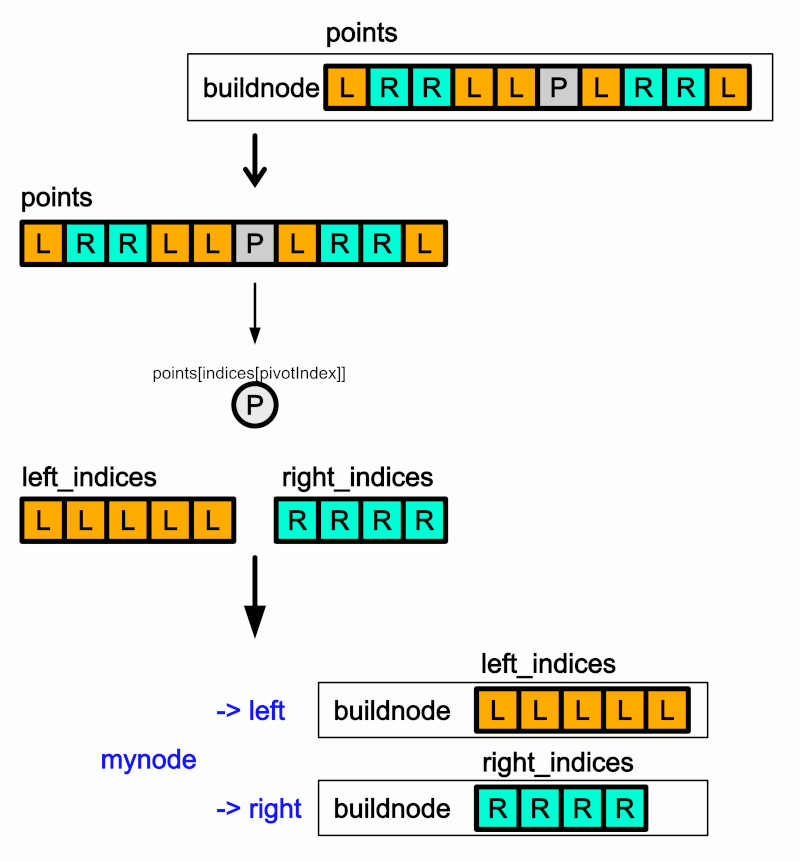
KdTreeを愚直に作成してみる。
mykdtree.hpp
#include<eigen/Dense>
#include <vector>
struct node{
   node(size_t index, int axis) : index(index), axis(axis){}
   size_t index; // 頂点ID
   int axis;     // 0:x, 1:y, 2:z
   node* left;   // ツリー1
   node* right;  // ツリー2
};
// pがpivotの左側にあるかどうかを判定
bool isLeft(const Eigen::Vector3d& pivot, const Eigen::Vector3d& p, int axis) {
   return p[axis] < pivot[axis];
}
// 再帰的にツリー作成
node* buildnode(const std::vector<Eigen::Vector3d>& points, std::vector<size_t>& indices,int axis) {

   if(indices.size()==0)
      return nullptr;
   if(indices.size()==1){
      // 最後のノードに頂点idを与えて返る
      node* mynode = new node(indices[0],axis);
      mynode->left = nullptr;
      mynode->right = nullptr;
      return mynode;
   }

   // pivot を決定
   size_t pivotIndex = indices.size() / 2;

   // indexの配列の中央をpivotとする
   Eigen::Vector3d Pivot = points[indices[pivotIndex]];

   std::vector<size_t> left_indices;  // ツリーの左側にセットするindexリスト
   std::vector<size_t> right_indices; // ツリーの右側にセットするindexリスト

   // pivot で分割
   for (size_t i = 0; i < indices.size(); i++) {
      if (i == pivotIndex) {
         continue;
      }

      if (isLeft(Pivot, points[indices[i]], axis)) {
         // ツリーの左側にセットするindexリスト更新
         left_indices.push_back(indices[i]);
      }
      else {
         // ツリーの右側にセットするindexリスト更新
         right_indices.push_back(indices[i]);
      }
   }

   // 新たなノード作成
   node* mynode = new node(indices[pivotIndex],axis);
   mynode->left = buildnode(points, left_indices, (axis+1) % 3);   // 左側を構築
   mynode->right = buildnode(points, right_indices, (axis+1) % 3); // 右側を構築

   return mynode;
}
class mykdtree {

   std::vector<Eigen::Vector3d>& _points;
   node* node_root;
public:
   mykdtree(std::vector<Eigen::Vector3d>& points) : _points(points) {}

   // ツリーの構築
   void build() {

      // 最初のindexリストを作成
      std::vector<size_t> indices(_points.size());
      for (size_t i = 0; i < _points.size(); i++) {
         indices[i] = i;
      }

      // 再帰的にツリー作成
      node_root = buildnode(_points, indices, 0/*X軸*/);

   }
   node* getRoot() {
      return node_root;
   }

};
// デバッグ用 ツリー内のすべてのindexを取得する関数
void getAllIndices(node* root, std::vector<size_t>& indices) {


   if (root == nullptr) {
      return;
   }

   // 現在のノードのindexを追加
   indices.push_back(root->index);

   // 左部分木のindexを取得
   getAllIndices(root->left, indices);

   // 右部分木のindexを取得
   getAllIndices(root->right, indices);
}
テストコード
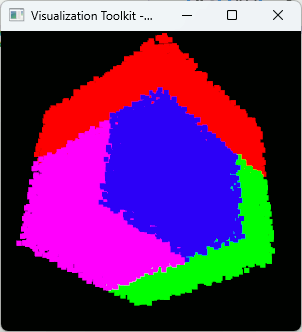
点群を分割できていることを確認するために、ツリーで分割した領域を着色してみる。
#include <iostream>

//VTK_MODULE_INITに必要
#include <vtkAutoInit.h>


#include <vtkSmartPointer.h>
#include <vtkRenderer.h>
#include <vtkRenderWindow.h>
#include <vtkRenderWindowInteractor.h>

#include <vtkPolyDataMapper.h>


#pragma comment(lib,"opengl32.lib")
#pragma comment(lib,"psapi.lib")
#pragma comment(lib,"dbghelp.lib")
#pragma comment(lib,"ws2_32.lib")

#include <Eigen/Core>
#include <array>

#include <vtkActor.h>
#include <vtkPoints.h>
#include <vtkPolyData.h>
#include <vtkUnsignedCharArray.h>
#include <vtkPointData.h>
#include <vtkVertexGlyphFilter.h>
#include <vtkProperty.h>

#include "mykdtree.hpp"

//必須
VTK_MODULE_INIT(vtkRenderingOpenGL2);
VTK_MODULE_INIT(vtkInteractionStyle);

// VTK表示用
struct MyVtkCloud {
   std::vector<Eigen::Vector3d> points;
   std::array<unsigned char, 3> color;
   std::vector<std::array<unsigned char, 3> > color_array;

   vtkSmartPointer<vtkActor> actor;
   void makeActor() {
      // VTKのデータ構造に変換
      vtkSmartPointer<vtkPoints> vtk_points = vtkSmartPointer<vtkPoints>::New();
      vtkSmartPointer<vtkUnsignedCharArray> vtk_colors = vtkSmartPointer<vtkUnsignedCharArray>::New();
      vtk_colors->SetNumberOfComponents(3); // RGB
      vtk_colors->SetName("Colors");

      for (size_t i = 0; i < points.size(); ++i) {
         // 点を追加
         vtk_points->InsertNextPoint(points[i].x(), points[i].y(), points[i].z());

         if (color_array.size() == 0) {
            vtk_colors->InsertNextTypedTuple(color.data());
         }
         else {
            vtk_colors->InsertNextTypedTuple(color_array[i].data());
         }
      }

      ////////////////////////////////////////////////////////////
      vtkSmartPointer<vtkPolyData> polyData = vtkSmartPointer<vtkPolyData>::New();
      polyData->SetPoints(vtk_points);
      polyData->GetPointData()->SetScalars(vtk_colors);
      ////////////////////////////////////////////////////////////
      vtkSmartPointer<vtkVertexGlyphFilter> vertexFilter = vtkSmartPointer<vtkVertexGlyphFilter>::New();
      vertexFilter->SetInputData(polyData);
      vertexFilter->Update();
      ////////////////////////////////////////////////////////////
      vtkSmartPointer<vtkPolyDataMapper> mapper = vtkSmartPointer<vtkPolyDataMapper>::New();
      mapper->SetInputConnection(vertexFilter->GetOutputPort());

      vtkSmartPointer<vtkActor> actor = vtkSmartPointer<vtkActor>::New();
      actor->SetMapper(mapper);

      // 頂点サイズを指定
      actor->GetProperty()->SetPointSize(5); // ここで頂点サイズを指定します

      this->actor = actor;
   }
};


int main(int /*argc*/, char** /*argv*/)
{
   MyVtkCloud cloud1;


   srand((unsigned int)7);
   // ランダムな点群を作成
   for (size_t i = 0; i < 50000; ++i) {
      cloud1.points.push_back(Eigen::Vector3d::Random());
   }
   cloud1.color = std::array<unsigned char, 3>{ 0, 255, 0 };
   cloud1.makeActor();

   // ツリー作成
   mykdtree kdtree(cloud1.points);
   kdtree.build();


   ////////////////////////////////////////////////////////
   ////////////////////////////////////////////////////////
   // 各領域を着色して表示
   std::vector<size_t> indices_left;
   std::vector<size_t> indices_right_right;
   std::vector<size_t> indices_right_left_right;
   std::vector<size_t> indices_right_left_left;

   node* root = kdtree.getRoot();

   // X軸の分割、左側のノードを取得 (赤)
   getAllIndices(root->left, indices_left);

   // X軸の分割、右側のノードの右を取得 (緑)
   getAllIndices(root->right->right, indices_right_right);

   // X軸の分割、右側のノードの左の右を取得 (青)
   getAllIndices(root->right->left->right, indices_right_left_right);

   // X軸の分割、右側のノードの左の左を取得 (紫)
   getAllIndices(root->right->left->left, indices_right_left_left);

   MyVtkCloud cloud_L;
   for (auto i : indices_left)cloud_L.points.push_back(cloud1.points[i]);
   cloud_L.color = std::array<unsigned char, 3>{ 255, 0, 0 };
   cloud_L.makeActor();

   MyVtkCloud cloud_RR;
   for (auto i : indices_right_right)cloud_RR.points.push_back(cloud1.points[i]);
   cloud_RR.color = std::array<unsigned char, 3>{ 0, 255, 0 };
   cloud_RR.makeActor();

   MyVtkCloud cloud_RLR;
   for (auto i : indices_right_left_right)cloud_RLR.points.push_back(cloud1.points[i]);
   cloud_RLR.color = std::array<unsigned char, 3>{ 0, 0, 255 };
   cloud_RLR.makeActor();

   MyVtkCloud cloud_RLL;
   for (auto i : indices_right_left_left)cloud_RLL.points.push_back(cloud1.points[i]);
   cloud_RLL.color = std::array<unsigned char, 3>{ 255, 0, 255 };
   cloud_RLL.makeActor();
   ////////////////////////////////////////////////////////
   ////////////////////////////////////////////////////////

   //////////////////////////////////////
   // 表示
   auto renderer = vtkSmartPointer<vtkRenderer>::New();
   renderer->AddActor(cloud_L.actor);
   renderer->AddActor(cloud_RR.actor);
   renderer->AddActor(cloud_RLR.actor);
   renderer->AddActor(cloud_RLL.actor);
   renderer->ResetCamera();

   //////////////////////////////////////
   auto interactor = vtkSmartPointer<vtkRenderWindowInteractor>::New();

   //////////////////////////////////////
   auto renderWindow = vtkSmartPointer<vtkRenderWindow>::New();
   renderWindow->AddRenderer(renderer);
   renderWindow->SetInteractor(interactor);
   renderWindow->Render();

   interactor->Start(); //イベントループへ入る

   return 0;
}
C++でpartitionするプログラムを書く
partitionは配列を[条件を満たす領域][満たさない領域]に分割する。C++の標準ライブラリにはstd::partitionという関数が用意されているので、用途によってはこれを使ってもよい。
#include <iostream>
#include <vector>
#include <algorithm>

// 偶数かどうかを判定する関数
bool is_even(int n) {
    return n % 2 == 0;
}

int main() {
    std::vector<int> numbers = { 1, 2, 3, 4, 5, 6, 7, 8, 9, 10 };

    // 偶数の要素を表示
    std::cout << "全データ: ";
    for (int i = 0; i < numbers.size(); i++) {
        std::cout << "[" << i << "] " << numbers[i] << std::endl;
    }
    std::cout << std::endl;
    // std::partitionで偶数と奇数に分ける
    auto it = std::partition(numbers.begin(), numbers.end(), is_even);
    size_t bound = std::distance(numbers.begin(), it);

    // 偶数の要素を表示
    std::cout << "偶数: " << 0 << " ... " << bound-1 << std::endl;
    for(int i=0;i< bound;i++){
        std::cout << "[" << i << "] " << numbers[i] << std::endl;
    }
    std::cout << std::endl;

    // 奇数の要素を表示
    std::cout << "奇数: " << bound << " ... " << numbers.size() << std::endl;
    for (int i = bound; i < numbers.size(); i++) {
        std::cout << "[" << i << "] " << numbers[i] << std::endl;
    }
    std::cout << std::endl;

    return 0;
}
自前で実装
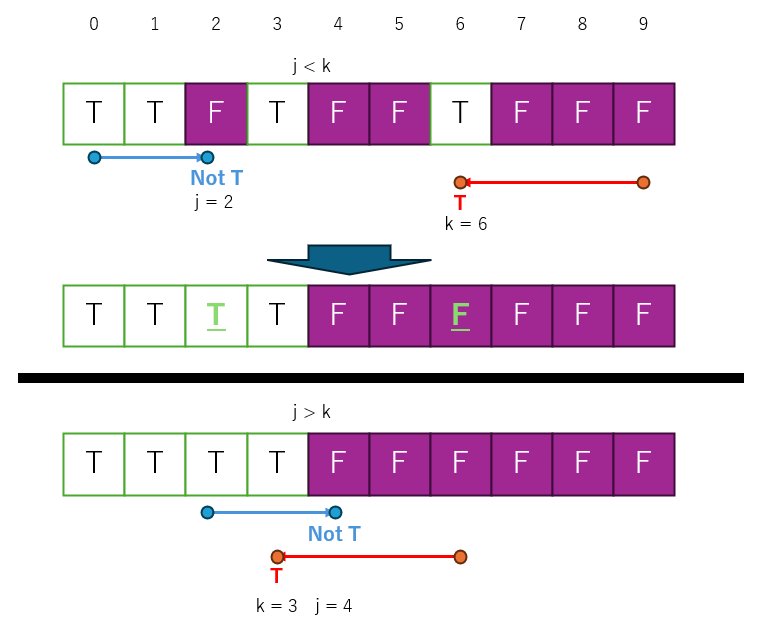
クイックソートと同じ原理で、配列の先頭と末尾から探索し、条件に合うものと合わないものを交換していけばできる。というかパーティションを再帰的に繰り返したのがクイックソートだといえる。
コード
#include <iostream>
#include <vector>
// 配列の分割を行う関数
template<typename Container, class PCond>
int64_t partition(Container& arr, int64_t low, int64_t high, PCond pivot) {

    int64_t i = low;
    int64_t j = high-1;

    int64_t bound;
    while (true) {

        // 条件に合致するものを探す
        while ( (pivot.IsTrue(i) == true) ) {

            i++;
            if (i >= high)
                break;
        }
        // 条件に合致しないものを探す
        while ( (pivot.IsFalse(j) == true) ) {

            j--;
            if (j == -1)
                break;
        }

        // 左右の走査が交差した場合に分割終了
        if (i >= j) {
            bound = i;
            break;
        }

        // 条件に合致しない要素とする要素を交換
        pivot.Swap(i, j);

        // 走査を進める
        i++;
        j--;
    }
    return bound;
}
enum MyBOOL {
    True,
    False
};
using PairType = std::pair<MyBOOL, std::string>;
// データを分割する時に必要な関数をまとめたもの
struct PartitionFunc {
    std::vector<PairType>& _array;

    PartitionFunc(std::vector<PairType>& arr):_array(arr) {}

    // 要素の交換関数
    void Swap(size_t i, size_t j) {
        std::swap(_array[i], _array[j]);
    }

    // 条件判定関数
    bool IsTrue(size_t i) {
        return _array[i].first == True;
    }
    bool IsFalse(size_t i) {
        return !IsTrue(i);
    }
};
int main() {

    std::vector<PairType> arr;
    arr.push_back(std::make_pair(True , "a"));
    arr.push_back(std::make_pair(False, "b"));
    arr.push_back(std::make_pair(False, "c"));
    arr.push_back(std::make_pair(True , "d"));
    arr.push_back(std::make_pair(True , "e"));
    arr.push_back(std::make_pair(True , "f"));
    arr.push_back(std::make_pair(False, "g"));
    arr.push_back(std::make_pair(True , "h"));
    arr.push_back(std::make_pair(False, "i"));
    arr.push_back(std::make_pair(True , "j"));

    std::cout << "分割前の配列: " << std::endl;
    for (size_t i = 0; i < arr.size(); i++) {
        std::cout << "[" << i << "] " << arr[i].first << " " << arr[i].second << std::endl;
    }

    PartitionFunc cond(arr);
    size_t bound_idx = partition< std::vector<PairType>, PartitionFunc>(arr, (size_t)0, arr.size(), cond);

    std::cout << "分割後の配列: " << std::endl;
    for (size_t i = 0; i < bound_idx; i++) {
        std::cout << "[" << i << "] " << arr[i].first << " " << arr[i].second << std::endl;
    }
    std::cout << std::endl;
    for (size_t i = bound_idx; i < arr.size(); i++) {
        std::cout << "[" << i << "] " << arr[i].first << " " << arr[i].second << std::endl;
    }

    return 0;
}
分割前の配列:
[0] 0 a
[1] 1 b
[2] 1 c
[3] 0 d
[4] 0 e
[5] 0 f
[6] 1 g
[7] 0 h
[8] 1 i
[9] 0 j
分割後の配列:
[0] 0 a
[1] 0 j
[2] 0 h
[3] 0 d
[4] 0 e
[5] 0 f
[6] 1 g
[7] 1 c
[8] 1 i
[9] 1 b
再帰関数の呼び出しをGraphvizで可視化する
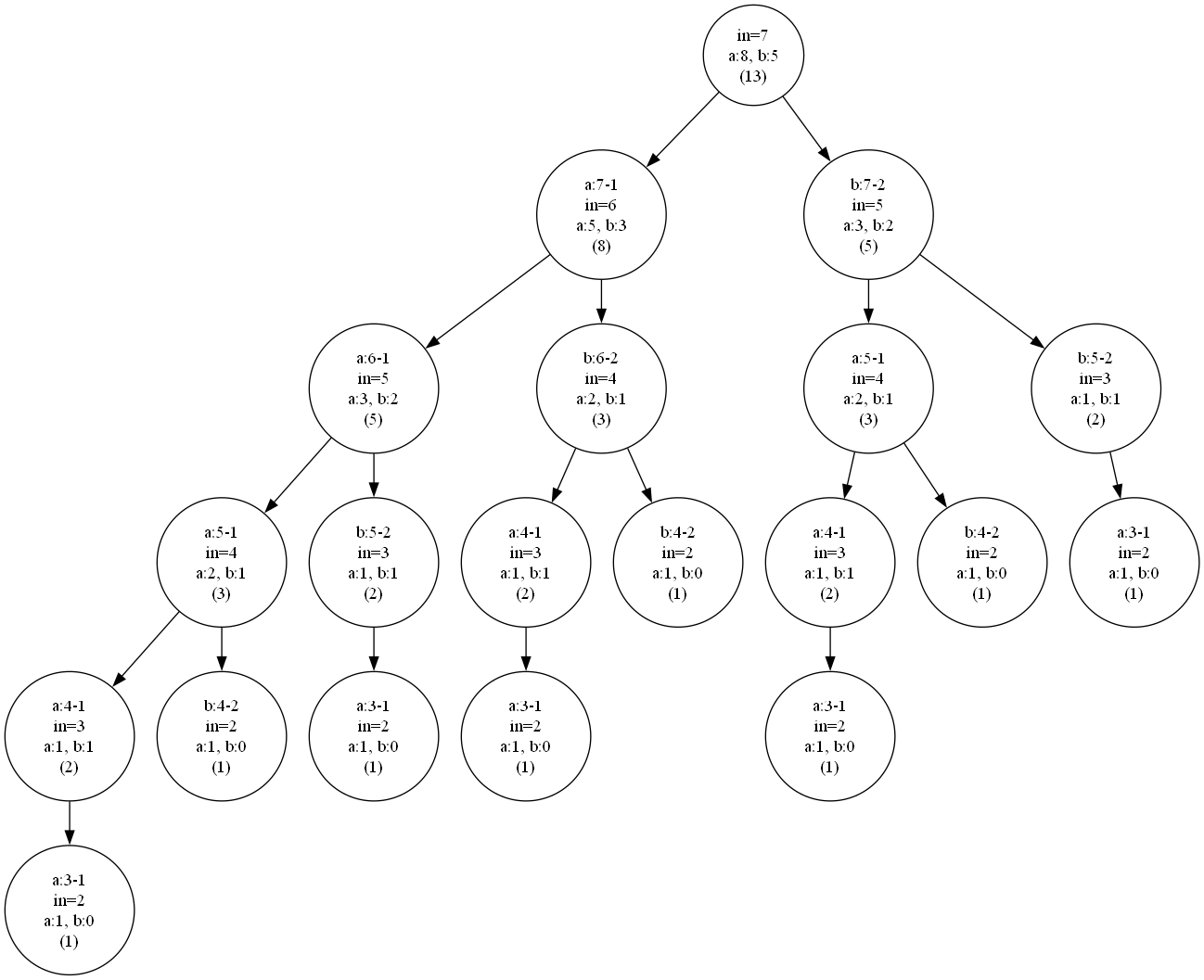
再帰関数のバグが治らないので再帰を可視化するコードを書いた。
.dotフォーマットで出力し、Graphvizで画像化する。
#include <iostream>
#include <vector>
#include <string>
#include <fstream>
#include <optional>

struct TraceNode {
   std::string name;
   std::string retval;
   std::optional<std::string> text;
   std::vector<TraceNode> children;
};
class RecursiveTrace {

   TraceNode root;
   std::vector<TraceNode*> stack;
public:
   void setText(std::string text) {
      stack.back()->text = text;
   }
   void addText(std::string text) {
      stack.back()->text = stack.back()->text.value() + text;
   }
   RecursiveTrace() {
      stack.push_back(&root);
   }
   TraceNode* getRoot() {
      return &root;
   }
   void push(std::string name="") {
      stack.back()->children.emplace_back();
      stack.push_back(&stack.back()->children.back());
      stack.back()->name = name;
   }
   void pop() {
      stack.pop_back();
   }
   void setReturn(std::string retval) {
      stack.back()->retval = retval;
   }

};
RecursiveTrace ftrace;
int fibonacci(int n) {

   if (n <= 1) return n; // 基底条件

   ftrace.setText( std::string("in=") + std::to_string(n)+"\\n");

   ftrace.push(std::string("a:")+std::to_string(n) + "-1");
   int a = fibonacci(n - 1);// 再帰呼び出し
   ftrace.pop();

   ftrace.push(std::string("b:") + std::to_string(n) + "-2");
   int b = fibonacci(n - 2);// 再帰呼び出し
   ftrace.pop();

   ftrace.addText("a:"+std::to_string(a)+", b:"+std::to_string(b));

   ftrace.setReturn(std::to_string(a+b));
   return a + b;
}
////////////////////////////////////////////////
////////////////////////////////////////////////
////////////////////////////////////////////////
// ノードを再帰的に出力する
void writeNodes(std::ofstream& file, const TraceNode& node, int& nodeId) {

   if (!node.text) return; // 無効なノードで出力を終了

   // ノードの名前を出力
   std::string name = (node.name.length()==0)?"":node.name + "\\n";
   std::string text = (node.text.value().length()==0)?"":node.text.value() + "\\n";
   std::string retval = (node.retval.length()==0)?"":"("+node.retval + ")";

   // ノードのテキストを出力
   int currentId = nodeId++;
   file << "    " << currentId << " [label=\""
      << name
      << text
      << retval
      << "\"];\n";

   // 子ノードの出力
   for (const auto& child : node.children) {
      if (child.text) { // 子ノードが有効か確認
         int childId = nodeId;
         file << "    " << currentId << " -> " << childId << ";\n";
         writeNodes(file, child, nodeId);
      }
   }
}
// Graphviz用のDOTファイルを生成する
void generateDotFile(const TraceNode& root, const std::string& filename) {
   std::ofstream file(filename);
   file << "digraph TraceTree {\n";
   file << "    node [shape=circle];\n";

   int nodeId = 0; // ノードIDのカウンタ
   writeNodes(file, root, nodeId);

   file << "}\n";
   file.close();
}
////////////////////////////////////////////////
////////////////////////////////////////////////
////////////////////////////////////////////////

int main()
{
   int ret = fibonacci(7);

   auto rr = ftrace.getRoot();

   // dotコマンドで画像を生成できる
   // 例
   // dot -Tpng RecursiveTrace.dot -o RecursiveTrace.png

   generateDotFile(*rr, "RecursiveTrace.dot");
}
結果
以下のコマンドで出力された.dotを画像化すると呼び出し履歴が見られる
nanoflannでKdTreeを使う
nanoflannというヘッダオンリーのライブラリがあり、KdTreeを実装している。
flannとついているがFLANN(Fast Library for Approximate Nearest Neighbors)とは別物らしい。
https://github.com/jlblancoc/nanoflann
ヘッダオンリーで、nanoflann.hppをプロジェクトにインクルードするだけで使える。
さらに、点群型をテンプレートで指定するのでOpen3D等の他のライブラリと併用するときも便利。
#include <iostream>
#include <vector>
#include <array>

#include "nanoflann.hpp"
// 点群データを表現するクラス
struct MyPointCloud {

    // 点群データ
    std::vector< std::array<float,3> > points;

    // nanoflannで必要となるインタフェース関数
    inline size_t kdtree_get_point_count() const {
        return points.size();
    }

    // nanoflannが呼び出す、点群の座標を返す関数
    // dim [0] [1] [2] は、それぞれ x, y, z
    inline float kdtree_get_pt(const size_t idx, const size_t dim) const {
        return points[idx][dim];
    }

    // BBOXは使わなくても定義は必要
    template <class BBOX>
    bool kdtree_get_bbox(BBOX&) const {
        return false;
    }

};
///////////////////////////////////////////////////////////
// KdTreeの定義(L2ノルム L2_Simple_Adaptor を使う3次元の点群)
// L2ノルムは、ユークリッド距離の2乗
// L1ノルムは、マンハッタン距離
using KdTree = nanoflann::KDTreeSingleIndexAdaptor<
    nanoflann::L2_Simple_Adaptor<float, MyPointCloud>,
    MyPointCloud,
    3 /* 次元数 */>;
///////////////////////////////////////////////////////////
void createCloud(MyPointCloud& cloud) {
    // サンプル点群を作成
    for (size_t i = 0; i < 30000; i++) {
        cloud.points.push_back(std::array<float, 3>{
            static_cast<float>(rand()) / RAND_MAX,
            static_cast<float>(rand()) / RAND_MAX,
            static_cast<float>(rand()) / RAND_MAX
            }
        );
    }
}
int main()
{

    MyPointCloud cloud;

    createCloud(cloud);

    ////////////////////////////////////////////////////////////////////////
    // leaf max size は1にしているので、最後まで分割される
    // leaf max size を2以上にすると、ツリーの末端では配列になり、総当たりでの探索になる
    KdTree tree(
        3 /* 次元数 */,
        cloud,
        nanoflann::KDTreeSingleIndexAdaptorParams(1 /* leaf max size */)
    );
    tree.buildIndex();
    ////////////////////////////////////////////////////////////////////////

    float P[3] = { 0.5, 0.5, 0.5 };
    float radius = 0.2;
    float search_radius = radius * radius; // 半径の二乗

    // 結果の格納先
    std::vector<nanoflann::ResultItem<unsigned int, float>> ret_matches;

    nanoflann::SearchParameters params;
    // 探索
    const size_t nMatches = tree.radiusSearch(
        P,
        search_radius,
        ret_matches,
        params
    );
    ////////////////////////////////////////////////////////////////////////
    std::cout << "found " << nMatches << " points\n";

    for (size_t i = 0; i < nMatches; i++) {
        std::cout << i << " point index: " << ret_matches[i].first << " distance: " << sqrt(ret_matches[i].second) << std::endl;
    }

}
icuでテキストの方向を特定
ubidiでテキストが左から右か、右から左か判定する。
#include <iostream>
#include <unicode/ubidi.h>
#include <unicode/unistr.h>
#include <unicode/utypes.h>

#if defined(_DEBUG)
#pragma comment(lib, "icuucd.lib")
#else
#pragma comment(lib, "icuuc.lib")
#endif

// SetConsoleOutputCP
#include <windows.h>

#include <codecvt>
bool isRTL(const std::u16string& text) {
    UErrorCode errorCode = U_ZERO_ERROR;

    const char16_t* buffer16 = reinterpret_cast<const char16_t*>(text.c_str());
    size_t buffer_length = text.length();

    // UBiDi オブジェクトを作成
    UBiDi* bidi = ubidi_openSized(buffer_length, 0, &errorCode);

    // テキストの方向性を解析
    ubidi_setPara(bidi, buffer16, buffer_length, UBIDI_DEFAULT_LTR, nullptr, &errorCode);
    if (U_FAILURE(errorCode)) {
        ubidi_close(bidi);
        return false;
    }

    // 方向を取得
    UBiDiDirection direction = ubidi_getDirection(bidi);

    // UBiDi オブジェクトを解放
    ubidi_close(bidi);

    // RTL なら true, LTR なら false
    return direction == UBIDI_RTL;

}
int main() {
    SetConsoleOutputCP(CP_UTF8); // コンソール出力にUTF8を指定

    std::u16string text[] = {
        u"Hello, how are you?",  // 英語(左から右)
        u"こんにちは、お元気ですか?",  // 日本語(左から右)
        u"안녕하세요, 어떻게 지내세요?",  // 韓国語(左から右)
        u"مرحباً، كيف حالك؟",  // アラビア語(右から左)
        u"שלום, מה שלומך",     // ヘブライ語(右から左)
        u"ܫܠܡܐ ܐܝܟ ܐܢܬܐ",      // シリア語(右から左)
        u"ހެޔޮން، ކިހިންދީ؟"         // ディベヒ語(右から左)
    };
    for(auto& t : text) {
        if (isRTL(t)) {
            std::cout << " RTL ";

            // u16string を UTF-8 に変換
            std::wstring_convert<std::codecvt_utf8_utf16<char16_t>, char16_t> converter;
            std::string utf8str = converter.to_bytes(t);
            std::cout << utf8str << std::endl;
        }
        else {
            std::cout << " LTR ";

            // u16string を UTF-8 に変換
            std::wstring_convert<std::codecvt_utf8_utf16<char16_t>, char16_t> converter;
            std::string utf8str = converter.to_bytes(t);
            std::cout << utf8str << std::endl;
        }
    }

    return 0;
}
| 方向 | 例文 | 言語 |
|---|---|---|
| LTR | Hello, how are you? | 英語 |
| LTR | こんにちは、お元気ですか? | 日本語 |
| LTR | 안녕하세요, 어떻게 지내세요? | 韓国語 |
| RTL | مرحباً، كيف حالك؟ | アラビア語 |
| RTL | שלום, מה שלומך | ヘブライ語 |
| RTL | ܫܠܡܐ ܐܝܟ ܐܢܬܐ | シリア語 |
| RTL | ހެޔޮން، ކިހިންދީ؟ | ディベヒ語 |
Google Compact Language Detector (CLD3)
CLD3はGoogleが提供する、文字列から言語を推測するためのライブラリ。Apache License 2.0。
推測するものなので、例えば「漢字」は中国語として判断される。
サンスクリット語とヒンディー語、ロシア語とウクライナ語など、同じ文字や単語を使っている言語の識別制度は低くなる。
今回はvcpkgでインストールする。
#pragma warning(disable:4996)

#ifdef _DEBUG

#pragma comment(lib,"libprotobufd.lib")
//#pragma comment(lib, "abseil_dll.lib")

#else

#pragma comment(lib,"libprotobuf.lib")

#endif

#include <cld3/nnet_language_identifier.h>

#pragma comment(lib,"cld3.lib")

// SetConsoleOutputCP
#include <windows.h>


int main() {

    SetConsoleOutputCP(CP_UTF8); // コンソール出力にUTF8を指定

    // 検出器を初期化(最小/最大テキスト長を指定)
    chrome_lang_id::NNetLanguageIdentifier lang_id(0, 512);

    std::string text8[] = {
        u8"日本",
        u8"你好",
        u8"汉字",
        u8"榊峠", // 榊も峠も和製漢字なので、日本語として判断されてほしい。が。。。
        u8"中国語では你好",
        u8"英語ではHello",
        u8"Hello",
        u8"Bonjour", // フランス語
        u8"안녕하세요",
        u8"こんにちは",
        u8"Здравствуйте", // ロシア語
        u8"Це моя книга", // ウクライナ語
        u8"Это моя книга", // ロシア語
        u8"مرحبا", // アラビア語
        u8"नमस्ते, आप कैसे हैं?",  // ヒンディー語
        u8"नमस्ते",  // ナマステ(サンスクリット語)
        u8"नमः सर्वेभ्यः।",// サンスクリット語
        u8"Olá"   // ポルトガル語
    };


    std::cout << u8"文,言語,精度" << std::endl;
    for( const auto& text : text8 ) {
        // 言語を検出
        auto result = lang_id.FindLanguage(text);

        std::cout << text << ",";
        std::cout << result.language << ",";
        std::cout << result.probability << std::endl;
    }

}
| 文 | 言語 | 精度 |
|---|---|---|
| 日本 | zh | 0.976997 |
| 你好 | zh | 0.999996 |
| 汉字 | zh | 0.998365 |
| 榊峠 | zh | 0.998102 |
| 中国語では你好 | ja | 0.999899 |
| 英語ではHello | ja | 0.999996 |
| Hello | sr | 0.830728 |
| Bonjour | no | 0.933856 |
| 안녕하세요 | ko | 0.999985 |
| こんにちは | ja | 1 |
| Здравствуйте | ru | 0.314022 |
| Це моя книга | uk | 0.902219 |
| Это моя книга | ru | 0.996748 |
| مرحبا | fa | 0.996155 |
| नमस्ते, आप कैसे हैं? | hi | 0.999293 |
| नमस्ते | mr | 0.999077 |
| नमः सर्वेभ्यः। | mr | 0.722388 |
| Olá | ga | 0.997063 |
Win32APIでIMEを使用(3)入力中の文字列(コンポジションウィンドウ)の枠を取得
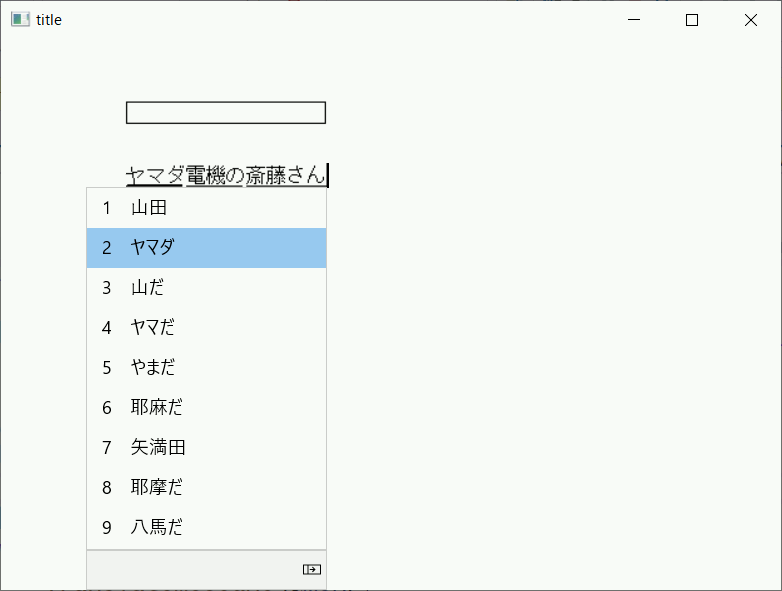
変換中の文字列が表示されている領域(コンポジションウィンドウ)を直接取得する方法は見つからなかったが、IMEが使用中のフォントを指定してGetTextExtentPoint32を使えば、編集中の文字列の縦・横のサイズと同じものをピクセルで取得できる。
ただ、コンポジションウィンドウのフォントを取得する方法がない。
取得する方法はないが設定はImmSetCompositionFontでできるので、設定した後であれば使用中のフォントがわかるのでそれを使う。
#pragma warning(disable:4996)

#include <windows.h>
#include <imm.h>
#pragma comment(lib, "imm32.lib")

#include <string>
// IMEで使用するフォントを設定
void SetFont(HIMC hIMC,HFONT hFont) {

    // フォントの情報を取得
    LOGFONT logFont = {};
    GetObject(hFont, sizeof(LOGFONT), &logFont);

    // IMEのコンポジションウィンドウにフォントを設定
    ImmSetCompositionFont(hIMC, &logFont);

}
// 変換中の文字列を取得
std::wstring GetCompositionString(HIMC hIMC) {
    std::wstring str;

    if (hIMC) {
        DWORD dwSize = ImmGetCompositionString(hIMC, GCS_COMPSTR, NULL, 0);
        if (dwSize > 0) {
            wchar_t* compStr = new wchar_t[dwSize / sizeof(wchar_t) + 1];
            ImmGetCompositionString(hIMC, GCS_COMPSTR, compStr, dwSize);
            compStr[dwSize / sizeof(wchar_t)] = L'\0';
            str = compStr;
            delete[] compStr;
        }
    }

    return str;
}
// 文字列を描画するサイズを取得
SIZE GetTextDrawSize(const std::wstring& str, HWND hWnd, HDC hdc) {
    // フォントの情報を取得
    HFONT hFont = (HFONT)SendMessage(hWnd, WM_GETFONT, 0, 0);


    // HDCにフォントを選択
    HFONT old = (HFONT)SelectObject(hdc, hFont);

    // 変換中の文字列のサイズを計算
    SIZE textSize;
    GetTextExtentPoint32(hdc, str.data(), str.length(), &textSize);

    SelectObject(hdc,old);

    return textSize;

}
// 変換中の文字列の描画領域を計算
SIZE CalculateCompositionStringSIZE(HWND hWnd, HIMC hIMC,HDC hdc) {

    SIZE size = { 0, 0 };

    if (hIMC) {
        std::wstring test = GetCompositionString(hIMC);

        size = GetTextDrawSize(test,hWnd,hdc);
        OutputDebugStringW(test.c_str());

    }

    return size;
}
// 変換中の文字列
void test_GCS_COMPSTR(HWND hWnd,HIMC hIMC, HDC hdc) {

    DWORD inputBytes = ImmGetCompositionStringW(hIMC, GCS_COMPSTR, NULL, 0);

    int inx = 100;
    int iny = 100;
    if (inputBytes) {

        SIZE size = CalculateCompositionStringSIZE(hWnd, hIMC, hdc);

        int iny2 = iny - 50;
        // inx ,iny-50 にsizeの矩形を描画
        RECT rect;
        rect.left = inx;
        rect.top = iny2;
        rect.right = inx + size.cx;
        rect.bottom = iny2 + size.cy;
        Rectangle(hdc, rect.left, rect.top, rect.right, rect.bottom);

    }
    if (inputBytes) {

        std::wstring text = GetCompositionString(hIMC);

        SetBkMode(hdc, TRANSPARENT);
        // 確定した文字列を描画
        TextOutW(hdc, inx, iny, text.data(), text.length());
        SetBkMode(hdc, OPAQUE);

    }

}
// GCS_RESULTSTR
void test_GCS_RESULTSTR(HIMC hIMC,HDC hdc) {


    // GCS_RESULTSTR ... IMEの入力が確定されたフラグ

    // 確定した文字列のバイト数を取得(NULLは含まない)
    DWORD inputBytes = ImmGetCompositionStringW(hIMC, GCS_RESULTSTR, NULL, 0);
    if (inputBytes) {

        size_t U16Count = inputBytes / sizeof(wchar_t) + 1;// wchar_tでの、NULLを含んだ文字数
        wchar_t* buffer = new wchar_t[U16Count];

        // 確定した文字列を取得
        ImmGetCompositionStringW(hIMC, GCS_RESULTSTR, buffer, inputBytes);
        buffer[U16Count - 1] = L'\0';

        // 確定した文字列を描画
        int inx = 100;
        int iny = 100;
        TextOutW(hdc, inx, iny, buffer, wcslen(buffer));

        delete[] buffer;
    }
}
LRESULT CALLBACK WndProc(HWND hWnd, UINT message, WPARAM wParam, LPARAM lParam) {

    HIMC hIMC;

    int inx = 100;
    int iny = 100;
    switch (message) {
    case WM_CREATE:

        // IMEを使用可能にする
        hIMC = ImmAssociateContext(hWnd, ImmCreateContext());

        SetFont(hIMC, (HFONT)GetStockObject(DEFAULT_GUI_FONT));

        break;


    case WM_IME_STARTCOMPOSITION:

        OutputDebugString(L"IME 入力開始\n");

        hIMC = ImmGetContext(hWnd);  // IMEコンテキストを取得
        if (hIMC)
        {
            // IMEのウィンドウ位置を設定
            COMPOSITIONFORM cf2;
            cf2.dwStyle = CFS_POINT;
            cf2.ptCurrentPos.x = inx;
            cf2.ptCurrentPos.y = iny;
            ImmSetCompositionWindow(hIMC, &cf2); // IMEのウィンドウ位置を設定
            ImmReleaseContext(hWnd, hIMC);
        }
        break;

    case WM_IME_COMPOSITION:

        // IMEの入力中の処理

        hIMC = ImmGetContext(hWnd);
        if (hIMC) {
            HDC hdc = GetDC(hWnd);

            RECT rc{ 0,0,640,480 };// 画面クリア
            FillRect(hdc, &rc, (HBRUSH)(WHITE_BRUSH));


            if (lParam & GCS_COMPSTR) {
                test_GCS_COMPSTR(hWnd,hIMC, hdc); // 編集中の処理
            }
            if (lParam & GCS_RESULTSTR) {
                test_GCS_RESULTSTR(hIMC, hdc); // 確定時の処理
            }
            ReleaseDC(hWnd, hdc);
            ImmReleaseContext(hWnd, hIMC);
        }
        break;

    case WM_IME_ENDCOMPOSITION:
        OutputDebugString(L"IME 入力終了\n");
        break;

    case WM_DESTROY:
        PostQuitMessage(0);
        break;

    default:
        return DefWindowProc(hWnd, message, wParam, lParam);
    }
    return DefWindowProc(hWnd, message, wParam, lParam);;
}

int WINAPI wWinMain(HINSTANCE hInstance, HINSTANCE hPrevInstance, PWSTR pCmdLine, int nCmdShow) {

    WNDCLASS wc;
    wc.style = CS_HREDRAW | CS_VREDRAW;
    wc.lpfnWndProc = WndProc;
    wc.cbClsExtra = 0;
    wc.cbWndExtra = 0;
    wc.hInstance = hInstance;
    wc.hIcon = LoadIcon(NULL, IDI_APPLICATION);
    wc.hCursor = LoadCursor(NULL, IDC_ARROW);
    wc.hbrBackground = (HBRUSH)(COLOR_WINDOW + 1);
    wc.lpszMenuName = NULL;
    wc.lpszClassName = L"SZL-IME-TEST";

    RegisterClass(&wc);

    HWND hWnd = CreateWindowW(L"SZL-IME-TEST", L"title", WS_OVERLAPPEDWINDOW, CW_USEDEFAULT, CW_USEDEFAULT, 640, 480, NULL, NULL, hInstance, NULL);


    ShowWindow(hWnd, nCmdShow);
    UpdateWindow(hWnd);

    MSG msg = {};
    while (GetMessage(&msg, NULL, 0, 0)) {
        TranslateMessage(&msg);
        DispatchMessage(&msg);
    }

    return (int)msg.wParam;
}
Win32APIでIMEを使用(2)
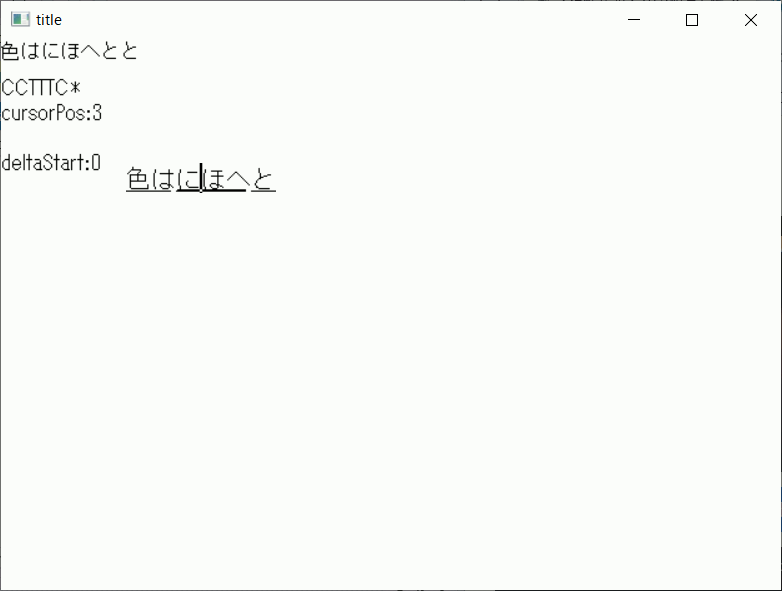
WM_IME_COMPOSITIONはlParamによって取得できる情報を区別している。特にGCS_COMPATTRは変換中の文字列の一文字ずつの情報を扱うのでATTR_*でさらに分岐が必要。
#pragma warning(disable:4996)

#include <windows.h>
#include <imm.h>
#pragma comment(lib, "imm32.lib")

#include <string>

// https://learn.microsoft.com/ja-jp/windows/win32/intl/ime-composition-string-values
// 変換中の文字列 GCS_COMPSTR
void test_GCS_COMPSTR(HIMC hIMC, HDC hdc) {

    DWORD inputBytes = ImmGetCompositionStringW(hIMC, GCS_COMPSTR, NULL, 0);
    if (inputBytes) {

        size_t U16Count = inputBytes / sizeof(wchar_t) + 1;// wchar_tでの、NULLを含んだ文字数
        wchar_t* buffer = new wchar_t[U16Count];

        // 確定した文字列を取得
        ImmGetCompositionStringW(hIMC, GCS_COMPSTR, buffer, inputBytes);
        buffer[U16Count - 1] = L'\0';

        // 確定した文字列を描画
        int inx = 0;
        int iny = 0;
        TextOutW(hdc, inx, iny, buffer, wcslen(buffer));

        delete[] buffer;

    }

}
// 変換中の文字列の属性情報 GCS_COMPATTR
void test_GCS_COMPATTR(HIMC hIMC, HDC hdc) {
    DWORD attr = ImmGetCompositionString(hIMC, GCS_COMPATTR, NULL, 0);

    BYTE* buffer = new BYTE[attr];// 変換中の文字数と同じ個数の要素を確保

    ImmGetCompositionString(hIMC, GCS_COMPATTR, buffer, attr);// 変換中の各文字ごとに状態情報が格納される

    char str[256] = {};

    for (size_t i = 0; i < 256; i++)
        str[i] = ' ';
    str[255] = '\0';
    TextOutA(hdc, 0, 30, str, strlen(str));


    size_t i;
    for (i = 0; i < attr; i++) {
        switch (buffer[i])
        {
        case ATTR_INPUT:
            str[i] = 'I';
            break;
        case ATTR_TARGET_CONVERTED:
            str[i] = 'T';
            break;
        case ATTR_CONVERTED:
            str[i] = 'C';
            break;
        case ATTR_FIXEDCONVERTED:
            str[i] = 'F';
            break;
        case ATTR_TARGET_NOTCONVERTED:
            str[i] = 'N';
            break;
        case ATTR_INPUT_ERROR:
            str[i] = 'E';
            break;
        }
	}
    str[i] = '*';
    TextOutA(hdc, 0, 30, str, strlen(str));


    delete[] buffer;
}
// 変換中の文字列内のカーソル位置
void test_GCS_CURSORPOS(HIMC hIMC, HDC hdc) {
    LONG cursorPos = ImmGetCompositionString(hIMC, GCS_CURSORPOS, NULL, 0);

    char str[256] = {};
    sprintf(str, "cursorPos:%d", cursorPos);

    TextOutA(hdc, 0, 50, str, strlen(str));

}
// 変換開始位置 GCS_DELTASTART
void test_GCS_DELTASTART(HIMC hIMC, HDC hdc) {
    LONG deltaStart = ImmGetCompositionString(hIMC, GCS_DELTASTART, NULL, 0);

    char str[256] = {};
    sprintf(str, "deltaStart:%d", deltaStart);

    TextOutA(hdc, 0, 90, str, strlen(str));

}
// GCS_RESULTSTR
void test_GCS_RESULTSTR(HIMC hIMC,HDC hdc) {
    // GCS_RESULTSTR ... IMEの入力が確定されたフラグ

    // 確定した文字列のバイト数を取得(NULLは含まない)
    DWORD inputBytes = ImmGetCompositionStringW(hIMC, GCS_RESULTSTR, NULL, 0);
    if (inputBytes) {

        size_t U16Count = inputBytes / sizeof(wchar_t) + 1;// wchar_tでの、NULLを含んだ文字数
        wchar_t* buffer = new wchar_t[U16Count];

        // 確定した文字列を取得
        ImmGetCompositionStringW(hIMC, GCS_RESULTSTR, buffer, inputBytes);
        buffer[U16Count - 1] = L'\0';

        // 確定した文字列を描画
        int inx = 100;
        int iny = 100;
        TextOutW(hdc, inx, iny, buffer, wcslen(buffer));

        delete[] buffer;
    }
}
LRESULT CALLBACK WndProc(HWND hWnd, UINT message, WPARAM wParam, LPARAM lParam) {

    HIMC hIMC;

    int inx = 100;
    int iny = 100;
    switch (message) {
    case WM_CREATE:

        // IMEを使用可能にする
        ImmAssociateContext(hWnd, ImmCreateContext());


        break;


    case WM_IME_STARTCOMPOSITION:

        OutputDebugString(L"IME 入力開始\n");

        hIMC = ImmGetContext(hWnd);  // IMEコンテキストを取得
        if (hIMC)
        {
            // IMEのウィンドウ位置を設定
            COMPOSITIONFORM cf2;
            cf2.dwStyle = CFS_POINT;
            cf2.ptCurrentPos.x = inx;
            cf2.ptCurrentPos.y = iny;
            ImmSetCompositionWindow(hIMC, &cf2); // IMEのウィンドウ位置を設定
            ImmReleaseContext(hWnd, hIMC);
        }
        break;

    case WM_IME_COMPOSITION:

        // IMEの入力中の処理

        hIMC = ImmGetContext(hWnd);
        if (hIMC) {
            HDC hdc = GetDC(hWnd);
            if (lParam & GCS_RESULTSTR) {
                test_GCS_RESULTSTR(hIMC,hdc);
            }
            if (lParam & GCS_COMPSTR) {
                test_GCS_COMPSTR(hIMC, hdc);
            }
            if (lParam & GCS_COMPATTR) {
                test_GCS_COMPATTR(hIMC, hdc);
            }
            if (lParam & GCS_CURSORPOS)
            {
                test_GCS_CURSORPOS(hIMC, hdc);
            }
            if (lParam & GCS_DELTASTART)
            {
                test_GCS_DELTASTART(hIMC, hdc);
            }
            ReleaseDC(hWnd, hdc);
            ImmReleaseContext(hWnd, hIMC);
        }
        break;

    case WM_IME_ENDCOMPOSITION:
        OutputDebugString(L"IME 入力終了\n");
        break;

    case WM_DESTROY:
        PostQuitMessage(0);
        break;

    default:
        return DefWindowProc(hWnd, message, wParam, lParam);
    }
    return DefWindowProc(hWnd, message, wParam, lParam);;
}